Showing posts with label virtual. Show all posts

Friday, May 23, 2014

My first VMUG experience -- Los Angeles May 22nd 2014

On Thursday, May 22nd 2014, I attended my very first VMUG.  The meeting took place in downtown Los Angeles at Ace Hotel in the Segovia Hall.


Over the years, I've been to quite a bit of events from various vendors or VARS. VMUG is quite different. For those of you who are not familiar with VMUG, it is a VMware User Group that is independent, global, customer-led organization created to maximize members' use of VMware and partner solutions through knowledge sharing, training, collaboration, and events. Membership is free. More information and membership application can be found on www.vmug.com.



In addition to the free membership, you can sign up to be a VMUG Advantage member and receive pretty good discounts on certification exams, books, software, VMworld, etc. 

The event that I attended was a mixture of sponsor and community based sessions.VMUG, being VMware’s community outreach program that bridges the gap between the users (or anyone interested) and the vendor itself. Contrary to what one might think, VMUG is run by the users themselves and receives the backing not only from VMware, but many other vendors such as Symantec, Dell, Puppet Labs, PRTG Network Monitor, Veeam etc. and provide sponsorship to the events. The events come in a multitude of varieties, ranging from User Group Meetings, (Online) Virtual Training and the big User Conferences.

The sponsors for this event were PureStorage and VMware and following is the agenda.


Meeting Highlights:

  • Pure Storage Presentation: Rise of All Flash Enterprise
  • Member Presentation: Automation Tools – Anthony Chow
  • Presentation: Automation - The End of Your Career as You Know It
  • Q&A and Networking


Upon my late arrival, I tried to grab an available seat without luck. So I hung around the back area for a bit where I ran into James Reale of VMware. It was such a surprise and pleasure to see him again. I eventually snagged some chairs but was only able to place them where a pillar partially obstructed the view. I suggest arrival on time to get good seats especially if you want to see what is going on up front.

Add caption


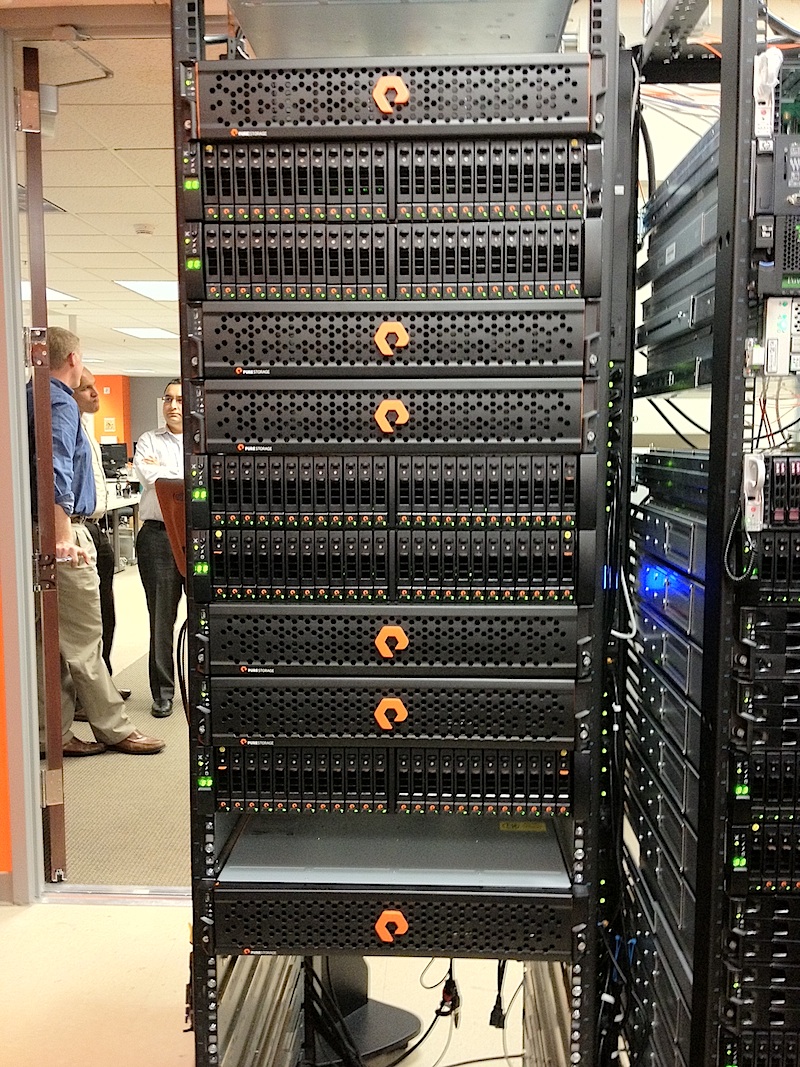
The first session was by PureStorage, where they discussed an all-flash storage array and showcased the user interface to manage the device. I have to admit I arrived to the meeting towards the end of this presentation. So I can't really report much about it.  Fortunately, I'd worked with a demo unit iabout a year ago. A cool feature I remember is the device encrypts all data on the system using self-encrypting SSD and AES-256 encryption and rather than storing the key in a small amount of non-volatile memory on the controller, it encodes the key with dispersal codes and then spreads it across all the SSDs in the systems; recovering the key requires half plus one of the SSDs. This means encryption at rest is good not just for drive disposal but for systems in transit-- as long as no more than half of the SSDs are shipped via any one interceptable route.  Another feature is that the storage device "phones-home" every 30 minutes.


This was followed by Tom Chow of Alcatel/Lucent where he discussed automation tools such as Puppet. Tom went over differences and similarities among the tools out there. Although the topics of Puppet, Chef, Ansible, Salt, etc. are very huge in content and matter, Tom was able to give us the broad strokes and exposure.


The next session was presented by Sam Hernandez of VMware. The topic was automation. It was a 3 or 5 slide presentation to guide the topic and conversation surrounding automation of daily tasks and therefore freeing up admin time for something more interesting.


Finally, there was a Q&A session with the panel consisting of VMware heavy-hitters from the industry.


From left to right: (Naomi Sullivan, Joe Cook, Charu Chaubal, Sam Hernandez)


Midway through the conference we took a break and delicious food/dishes were served. A selection of steaks, grilled chicken, couscous, lemon pasta, brown rice mix, potatoes, and others that I can't quite remember were served along with vBeers and vWine (remember don't drink and drive).  Yum!

Richard Avila, Nelson Lopez, Martin Perez


The close of the conference ended with drawings for several giveaways including a Go Pro 3. My colleague Nelson put his card in draw the last minute and ended up winning the big prize of the evening.


This is what the t-shirt SWAG consisted of for this conference:


The SWAG pictured below is a smart phone holder/mount that flips out when in use and flips down for storing. To me, it looked like a giant pill splitter. Asking my colleagues if they got their giant pill splitter got a lot of chuckles from other guys who overheard.


In closing if you have not been to a VMUG and you can find the time, get yourself to the next conference and see what it’s all about. 

If you're willing to walk up to someone and say hello, they are likely to respond and it’s those networking conversations where the hidden value of the VMUG really lies.


Thanks to the Los Angeles VMUG comittee for putting on a great meeting and I will hopefully be seeing you all again in VMUG conference. Special thanks to Martin Perez for helping my colleagues Nelson Lopez, Richard Avila, and me feel welcome and at our first VMUG.


yep, that's me, John Mendoza

https://www.facebook.com/LosAngelesVmug
http://www.vmug.com/index.php?mo=cm&op=ld&fid=217&gid=121


Thursday, May 1, 2014

Application Virtualization Options

A colleague recently asked me what tools I use or have used for application virtualization. After the conversation, I realized the topic became quite involved and detailed, and decided to organize the comments and information. 

There is no doubt that there is a plethora of application virtualization tool out there. The question is, “How do you tell them apart?”

Application Virtualization divorces the apps from the OS; allowing it to be delivered efficiently. Other benefits include: applications not needing to be installed on the end user computing device, easier to patch and upgrade, concurrent execution of multiple versions of the same app on the same end user computing device, and application streaming allows delivery to all sorts of mobile devices or endpoints (B.Y.O.D.).


Major players in this quadrant include VMWare ThinApp, Citrix XenApp, and Microsoft APP-V. Each product integrates best with its own vendors product offerings; for instance, Microsoft Hyper-V with App-V or VMWare Horizon with ThinApp.
The following application virtualization comparison, I’ll cover the different features, capabilities and support these tools offer.


Citrix XenApp – ThinApp and App-V only provide app virtualization. XenApp is an overall. application delivery system. Citrix Streaming  is the vendor's application virtualization technology. XenApp is useful for IT shops that have a wide variety of applications -- old and new -- and want to virtualize apps with Citrix Streaming that ThinApp and App-V don't support. Citrix XenApp 6.5 reduces application launch times through the Instant App Access feature. Improvements to the HDX protocol also allow apps to be run in higher-latency environments. Plus, XenApp 6.5 includes a mobility pack that improves application delivery to mobile devices.


VMWare ThinApp – ThinApp offers a couple of capabilities XenApp and App-V do not. For instance, it can deliver offline applications, and it's the most portable of the application virtualization tools. You can run ThinApp applications from almost anywhere because users don't need to install software or device drivers. Some administrators say ThinApp is somewhat cumbersome to deploy. It's also trickier to manage applications because it doesn't come with a centralized management platform. ThinApp 4.6 integrates with VMWare View 4.5 and above. ThinApp Factory automates the application packaging process. This virtual appliance, which plugs into vCenter or VMware Workstation, takes the encoding and distribution out of administrators' hands.


Microsoft App-V - App-V provides centralized management, so admins can limit users' access to certain apps. The latest version, App-V 5.0, reduces disk requirements by allowing IT to turn off local application storage. Plus, it has enhanced application diagnostics and monitoring. App-V has an agent component that pushes applications to the user without Active Directory settings, using Microsoft System Center Configuration Manager. This application virtualization tool also allows you to break down application suites (such as Office) and deliver the apps without losing any integration functionality.

ThinApp has portability in its pocket, but App-V supports 64-bit and server applications, which ThinApp does not.


Alternatives to the major vendors of application virtualization do exist out there. For instance, Spoon Studio is easy to use and integrates with the company's cloud offering. InstallFree is another choice, but it doesn't offer offline functionality.


Spoon Studio
Spoon used to be called Xenocode and was more widely recognized as an OEM product from Novell called Zenworks Application Virtualization.
The company, now called Spoon Inc., offers the Spoon Studio application virtualization product along with Spoon Server and Spoon.net. Spoon Studio is very easy to use and can integrate with either a physical delivery system (such as USB or Spoon Server) or its cloud offering Spoon.net. It is a very versatile product.


Evalaze
Evalaze is a newer application virtualization tool on the market. It has three editions: a free Private edition, Professional edition and Commercial edition. The free edition is severely limited in features compared to the other two, but it does allow for an unlimited number of virtualized applications.
I wanted to try the Professional edition, but they do not offer a trial link for download. However, they do have a Commercial edition trial, which includes the proverbial kitchen sink of tools for your use, including distribution licenses and technical support. I had some trouble sending a request for the trial, but it looks promising from their marketing. You'll need to judge for yourself if you can get them to answer!
The company also has an application virtualization "service," which takes the application and files that you upload and creates the virtualized package for you. That's kind of cool in today's world of Software as a Service.


InstallFree
This is a tough one. I really like the InstallFree interface, pricing (free or subscription-based) and versatility of this app virtualization tool. However, you must have an Internet connection to use it. It doesn't provide the same offline functionality of VMware ThinApp or others. If having your application available offline is not a deal-breaker for you, this product might be up your alley.


Portable Apps
Portable Apps provides a basic way to create and carry your applications wherever you go on a USB stick or drive. It is really what VMware ThinApp started out to be, but the vendor evolved ThinApp into a very large package with added functionality. Sometimes, you just need an application to be portable, and this product does that very well.
I believe all administrators should have this as a core item in their admin toolbox. Best of all, it's free, requires no registration and never nags you.


Symantec Workspace Streaming
This product is most often used by administrators that want to virtualize as many applications as possible or want to micro-manage their app license tracking. Symantec Workspace Streaming does a great job of virtualizing more applications than VMware ThinApp, but it also requires a client agent and streaming server, which ThinApp does not.
Workspace Streaming also lacks an intuitive user interface and is clouded by Symantec Corp.'s difficult licensing and support. ThinApp is more portable than this product and has more flexibility rather than complexity.
VMware ThinApp truly is a flexible, easy to use and versatile application virtualization tool. Still, some administrators need something closer to Portable Apps or will want to check out lower prices.


Friday, April 11, 2014

HOWTO: Re-enable VMware Console copy/paste functionality

HOWTO: Re-enable VMware Console copy/paste functionality

So, if you’re like me, you copy and paste a lot fro your VM consoles – or *want* to.  It kind of drove me nuts for a while, as I was certain I’d done this in the past, hit or miss.  Turns out it’s a feature that got disabled by default after vSphere 4.1 as a “security concern”. 
Now, I can understand why or how it could be a concern, but let’s be realistic:
  • A user who has access to the console, is likely a Domain Admin – or at least a vSphere Admin, unless roles have been delegated

  • We likely have DEV/TEST environments, and/or DMZ’s that have VM’s that can’t easily see, browse, RDP, 
  • etc, to your workstation or other networks.

  • Copy and paste is *good*, darn it!


By far the best option for me is the second option, which enables it for all VM’s on a host:
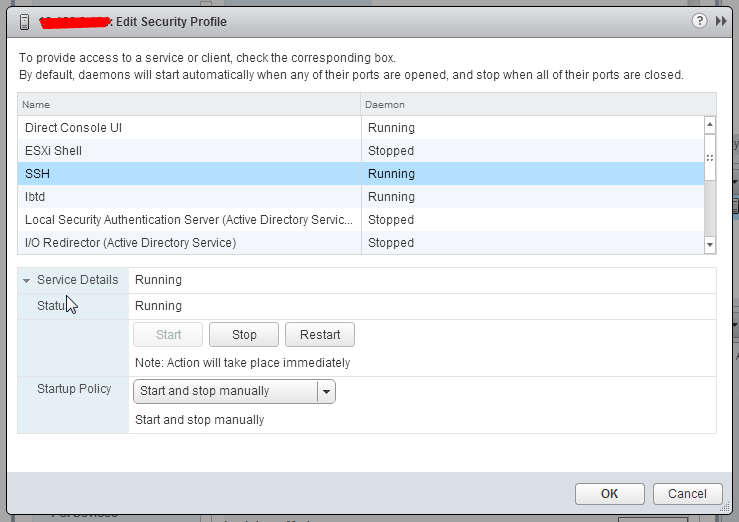
First ensure SSH server is running on the ESXi host.

Then make sure the firewall on the ESXi host will allow SSH connections

  1. Log in to the ESX/ESXi host as a root user.


  1. Take a backup of the /etc/vmware/settings file.


  1. Open the /etc/vmware/settings file using a text editor.


  1. Add these entries to the file: isolation.tools.copy.disable="FALSE" 
    isolation.tools.paste.disable="FALSE"


  1. Save and close the file. 


The Copy and Paste options are only enabled when the virtual machines restart or resume the next time or shutdown and power-on the virtual machine for changes to take effect
It should be noted that these changes will not remain after a host upgrade.  So you may need these to be part of your scripting, use the vMA, or my preference, embed it in your kickstart.cfg files you use for installation customization.